Your mineral
The machine itself: its name, where its backup goes, the computers that can open it, and your own pages.
The page about the machine itself rather than about what it knows.
Most people open it twice: once out of curiosity, and once when something about the backup needs settling.
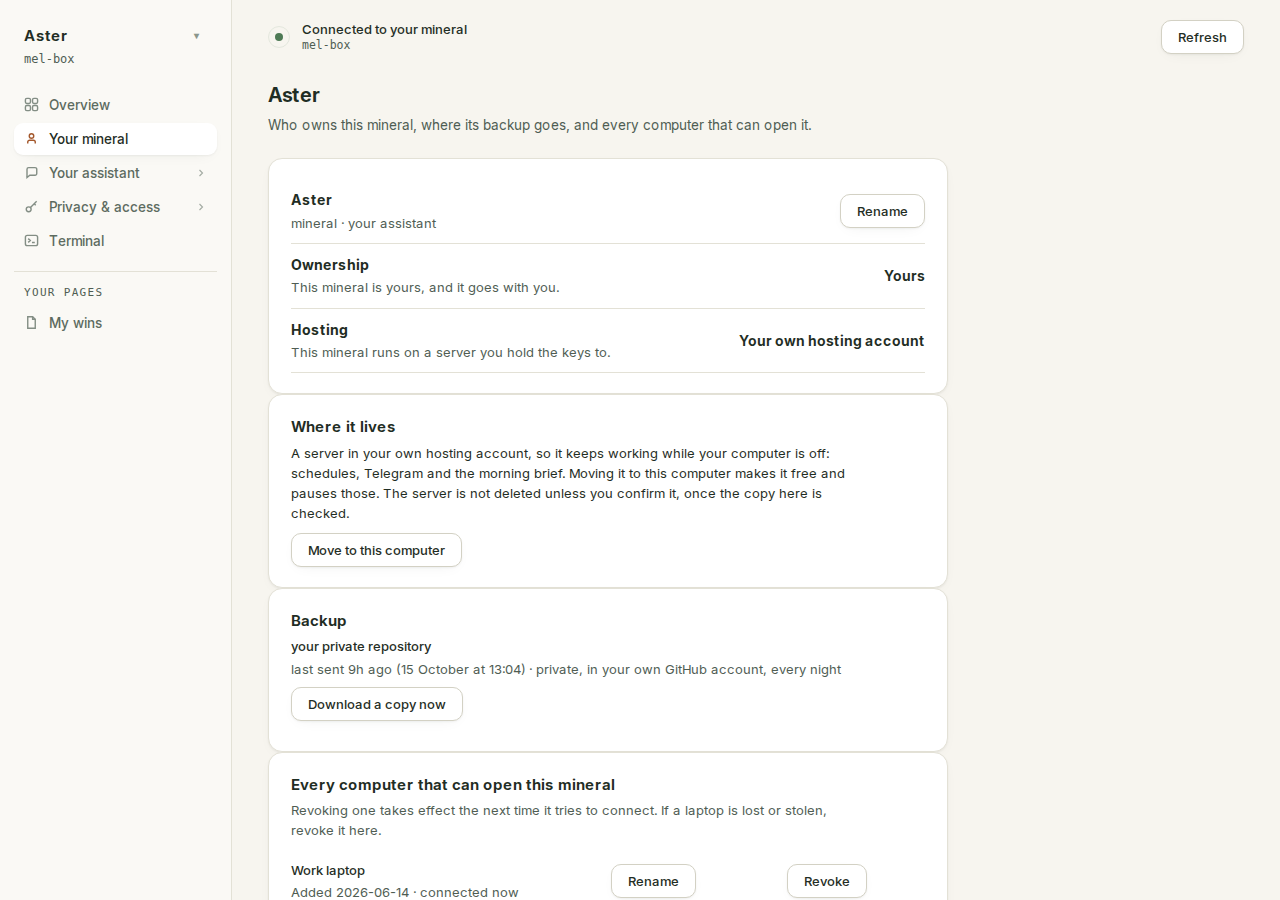
The page names itself after your mineral#
The sidebar tab says Your mineral, and so does the heading until the first read from your mineral lands. Then the heading becomes the mineral's name, which is also your assistant's name: one name, everywhere. The kind of thing it is ("mineral · your assistant") demotes to the line under the name, because it describes what this is, not which one is yours.
Rename sits beside the name, and the form under it says exactly how far a rename reaches: "Just the name you see. The address and your keys stay exactly as they are."
Whose machine this is#
The short answer, for every mineral made since September 2026: yours, in the plainest sense available. The card's Ownership row says Yours and its Hosting row says Your own hosting account. The server sits in your own hosting account, Hetzner or DigitalOcean, billed to you by them, and the only keys that open it are on your own roster. There is no other candidate: whoever pays the hosting bill and holds the keys holds the box, and both are you by construction. The longer version of that argument is who edits what.
One exception. If your company set your assistant up for you with Crads for Teams, the server sits in the owner's hosting account and the company owns it. Your personal/ folder is kept out of the company brain and away from colleagues, but it is not secret from whoever runs the server.
Backup#
The Backup card has two renderings. Connected, it shows the repository by name, when the last snapshot was sent, and whose account it lives in: private, in your own GitHub account, every night. Not connected, it does not soften anything: "Your brain lives on this mineral and nowhere else."
A download works in both states, no GitHub account needed: Download a copy now when a repository is connected, Or download a copy beside Connect my GitHub when it is not. It hands you the brain as a file, straight from the mineral. So even before you connect a repository, a copy of everything is one click away.
Connecting GitHub without leaving the page#
Connect my GitHub runs the whole flow inside the card. Press it and you get a short code and a github.com address to enter it at, on any device. "Waiting for you to approve it. This card checks by itself." Once you approve, the card walks through its steps line by line, and finishes with where your brain now lives: a private repository, yours, which the mineral keeps up to date from here.
If a step fails, the card names the leg that failed and keeps the lines that did work on screen, so a retry is an informed decision rather than a guess: "Nothing was lost: every step is safe to run again, so pressing Connect my GitHub picks up where this stopped."
The whole story, including the one step only you can do, is back up your mineral.
Every computer that can open this mineral#
Under the backup card sits the roster: every computer whose SSH key opens this mineral, with when it was added and when it was last seen. It is the same file the mineral's door checks, so what is listed here is exactly what can connect, and nothing else can. Rename gives a row a name you will recognise later (a computer that added itself is listed as "This computer"). Revoke takes effect the next time that machine tries, and also removes it from every sealed secret; adding it back later does not restore those. If a laptop is lost or stolen, this is where you shut it out. A support window you granted from Help shows here as its own row, with its own Revoke. Adding one is its own two-minute walk, done from a computer that is already on the list. Devices and access has the whole model.
Your pages#
The last card lists the pages your assistant has built for you: each one is also an entry in the sidebar under "Your pages". Remove one here and it goes from the sidebar too, after the same are-you-sure the page's own header uses. Ask for a new one with /write-page, in the Terminal or in Claude Code on your mineral.
Why there is no danger zone#
There is no delete button on this page, and that is not an oversight to hunt past. Your mineral is a server in your own hosting account, so ending it is an act you take there: delete the server in your own hosting console, and the bill stops with it. Nothing of the software stands between you and that, which is the point; just do the backup first, because a deleted server takes its disk with it.